
Choose an AI subtitle tool by the output you need. A finished gaming clip with text on the picture and an editable subtitle file are different deliverables. CapCut, VEED and Descript offer caption workflows, but the useful question is whether you can correct the words and obtain your required export in the version and plan you will actually use.
This guide combines official documentation checked on 15 October 2026 with a small, hands-on VEED guest-editor trial. We uploaded our own clean synthetic English and German speech samples. CapCut and Descript were researched rather than tested with those recordings. The results below are a workflow check, with no cross-tool accuracy ranking.
Decide between captions on the picture and a subtitle file
Burned-in captions are part of the video image. A separate SRT or VTT file contains text and timing that a compatible player can display. Before choosing an editor, check how your destination accepts subtitles. Keep a corrected text version as well, so a later change does not require starting from the audio again.
For a vertical clip, inspect the text at phone size and leave room for the destination’s controls. For a longer tutorial, check the line breaks and timing. A stylish preset does not establish that a name, a game setting or a spoken instruction is correct.
| Tool | Separate subtitle file | What to check before committing |
|---|---|---|
| CapCut | SRT or TXT in its export guidance | Web, desktop and mobile differ; check the exact version and export. |
| VEED | SRT, VTT or TXT listed | Our guest SRT download opened a paid upgrade screen. |
| Descript | SRT or VTT in its help guide | Free media allowance and video-export limits are separate from file format. |
CapCut: check the platform as well as the feature
CapCut describes automatic web captioning and customisable styles, with a free-use claim for that web feature. Its export help lists SRT and TXT for automatically recognised captions. Those statements do not establish that every template, extra AI feature or app version is free.
The subtitle-import guide makes a practical platform distinction: web and desktop support importing external subtitle files, while its mobile guidance says direct import is unavailable. If you already edit in CapCut, first try your exact file-to-export route there. Avoid moving a project between platforms until you know the feature you need is available.
VEED: recognition worked, the SRT download was gated
We tested VEED in its browser guest editor without buying a plan. The English file used a Microsoft David synthetic voice and lasted 21.075 seconds. The German file used Microsoft Hedda and lasted 24.055 seconds. Both were mono, 16 kHz WAV recordings of our own short Game Head introduction, with no music, gameplay, overlapping speakers or private recording.
After choosing English (US), we generated captions and saved the unedited visible text. The spoken word sequence matched our English reference after ignoring case, punctuation and line breaks. For the separate German project, we selected German (Germany). Its output included Gamehead. where our reference said Game Head. That is a concrete brand spelling to review before publishing.
The SRT download attempt in the English project opened a checkout panel offering paid plans. We did not upgrade, and no SRT download completed. VEED’s own subtitle page also distinguishes starting for free from downloading subtitle files. Check the export route before processing a long recording.

These two clean synthetic samples cannot establish performance on accents, excited speech, game noise or a whole stream. We did not test a German export or complete a manual correction in the editor. Do not turn this small trial into a general accuracy percentage or a reason to skip proofreading.
Descript: useful to investigate for a transcript-led workflow
Descript’s current pricing table lists 60 media minutes per editor per month on Free, including German and English transcription. It lists 720p local video export, with watermark-free video export excluded from Free. These are video and media allowances; they should not be confused with subtitle-file compatibility.
Its export guide documents SRT and VTT, with settings for line length, lines per card and speaker labels. If your work begins with a long spoken recording, investigate whether correcting the transcript and shaping the edit in one place fits your process. We have not validated that complete route in a Descript account.
Run your own short export test before paying
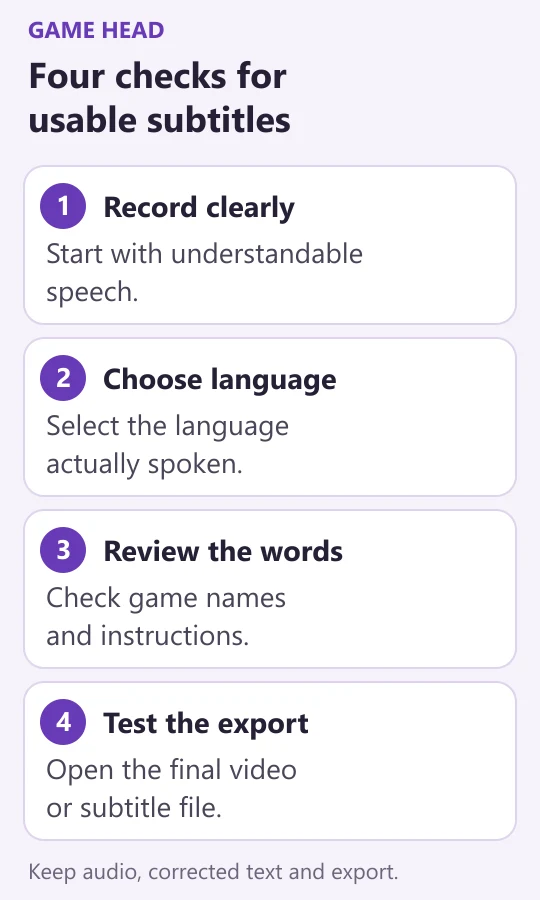
Use a representative excerpt from your own content, not a perfect sample supplied by a vendor. A useful trial includes a quiet explanation, one faster passage and the names you actually say. Keep the same recording for each candidate and record the spoken-language setting, date, plan and output format.
- Compare the generated words with the recording, including game names and instructions.
- Check when each caption appears and disappears; do not judge timing from text alone.
- Open the final video or subtitle file in the intended destination.
- Note corrections and the steps needed to obtain that export.
- Check allowances, watermark, billing period and any extra charges before purchasing.
Choose according to that completed route. An existing CapCut workflow may be the first place to try; VEED offers a browser route whose file-export cost needs checking; Descript is a candidate when the transcript is central to editing. The strongest result is the one that meets your output needs with manageable correction work, rather than the longest AI feature list.
Make the source recording easier to understand
Caption tools still depend on what they can hear. Check a short recording before a long session. Our microphone and OBS setup guide helps separate positioning and level problems from equipment purchases. If you are still choosing a streaming format, start with our Twitch decision guide before adding another subscription.
Keep a small project note with the original audio, corrected transcript and tested export. Recheck limits when changing plans or app versions. All vendor links here are ordinary source links; this comparison currently contains no software affiliate tracking.