

Your GTA Online nightclub warehouse accumulates goods when technicians are assigned to eligible businesses you own. You do not buy supplies for this warehouse, but you still need to complete a sale to turn stock into cash. Start with the businesses and goods you actually have; a fixed million-dollar promise says little about your setup.

Match the goods to your businesses
The GTA Wiki warehouse reference lists seven goods categories. Up to five technicians can work at once, with one technician on each assigned category. Owning the matching business unlocks its goods; complete its setup and keep the operation available.
| Goods category (English game label) | Linked business |
|---|---|
| Cargo and Shipments | Hangar or Special Cargo warehouse |
| Sporting Goods | Bunker |
| South American Imports | Cocaine lockup |
| Pharmaceutical Research | Meth lab |
| Cash Creation | Counterfeit cash factory |
| Organic Produce | Weed farm |
| Printing and Copying | Document forgery office |
Use these labels to check your management screen. They are a mapping, not a ranking or a shopping list. If you own only two eligible businesses, extra technicians cannot create three more production lines without the corresponding operations.
From business to warehouse sale
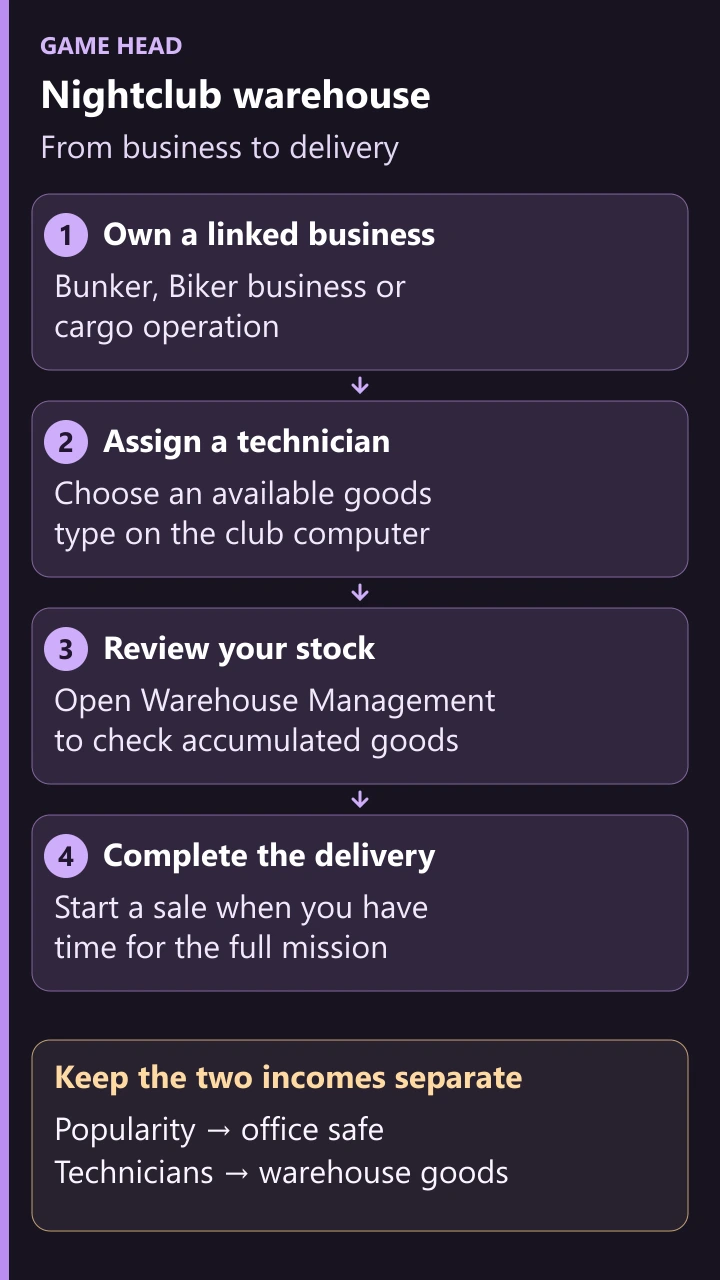
On the nightclub computers, assign technicians to available goods, check stock and start the delivery. Collect the office safe separately.
Keep supplies, stock and upgrades separate
Nightclub stock is separate from product in the linked business. Empty supplies in that business do not mean you must resupply it just for nightclub accrual. Its own production is a different activity. GTABase’s setup explanation distinguishes these systems and notes that the linked businesses must remain operational.
The nightclub equipment upgrade increases technician production speed; storage floors increase capacity. The staff upgrade is for popularity upkeep. Before buying more storage, check whether you have assigned technicians and whether the existing goods actually need more room.
Do not wait blindly for every category to fill
Goods categories fill at different rates. Once a category reaches its limit, leaving a technician on it does not keep increasing that category. Check whether to sell or move the technician to another available category. Filling the entire warehouse can involve reassignment rather than leaving five technicians untouched.
A larger stock value is a larger single delivery, not proof of a better hourly return. Decide around active production, the time available for a sale and the risk you are willing to take. Compare the sale screen’s goods and value before launching; payouts can also differ with event bonuses and sale conditions. There is no universal “five technicians equals this payout” rule.
Plan the sale before launching it
You can run business sales in an invite-only session. Rockstar’s private-session update explicitly added that option; older advice that all sales require a public lobby is outdated. A private session avoids interference from rival players, but mission enemies, the delivery route and vehicle damage still matter.
- Open Warehouse Management and check the stock you intend to sell.
- Choose a session and register as a VIP, CEO or MC President as needed.
- Check that the delivery fits the time you have; then start the sale and follow its instructions.
- After completing it, check the remaining stock and technician assignments.
Check a stalled production line before spending more
- Is a technician assigned to the goods category?
- Is the matching business owned, set up and operational?
- Has this category already reached its storage limit?
- Have you allowed enough online time for its production cycle?
- If those checks pass, try removing and reassigning the technician, then check again after a cycle.
Reassignment is a troubleshooting step, not a guaranteed fix. If a line still stalls, Rockstar Support is the next stop. Avoid moving properties or repeatedly shutting down businesses just because the total stock did not change immediately.
Warehouse income is not the safe
Popularity controls the office safe, not which warehouse goods a technician can accrue. Keep a separate popularity and safe routine alongside warehouse checks. The main nightclub guide compares both income streams.
Do not assume that every nightclub is raid-proof. The GTA Wiki raid reference describes nightclub raids and protection tied to security upgrades. Check the current in-game security options for your setup rather than treating warehouse stock as risk-free.
Questions about the nightclub warehouse
Does it produce while I am offline?
Plan around time spent in GTA Online, not time logged out. Check each category when you return.
Must I fill the entire warehouse before selling?
No. Look at full categories, available technician assignments and your next delivery window. Waiting for the largest single sale is not automatically the most useful schedule.
Does nightclub popularity fix a stalled technician?
No. Check the assignment, linked operation and storage for that category; a popularity task is for the club’s safe income.

