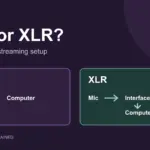

A microphone upgrade is useful when it solves a problem you can actually hear: a voice that is too distant, awkward controls or a setup that cannot handle the recordings you want to make. For one person streaming from one computer, USB keeps things simple. XLR gives you a separate microphone and interface to choose, but adds equipment and setup work.
This guide compares the features and setup requirements of nine microphones or bundles, including older models you may find on sale or already own. It is a buying guide based on manufacturer documentation, not a hands-on sound test or a ranking of every current microphone. Recommendations below are our assessment of which features fit a particular use.
Advertising / affiliate links: As an Amazon Associate I earn from qualifying purchases. Links labelled “Amazon.de” are affiliate links to the German store. Check the exact model, seller, delivery options and current price before buying.
Start with your setup
- A single voice and a straightforward connection: start with USB. A headphone output and an accessible mute control can matter more in daily use than a long specification sheet.
- You want to mix game audio, voice and other applications: compare software routing and computer requirements as well as the microphone. The original Elgato Wave:3 is one option in this guide.
- You already have an interface or need several microphones: consider XLR. Check the interface inputs, power and gain before choosing a microphone.
- Your room or keyboard dominates the recording: first try a closer microphone position, a quieter computer and less reflective surroundings. Buying a different connector will not remove those sounds.
For a fuller explanation of the signal path and equipment costs, see our USB vs XLR microphone guide.
Streaming microphone comparison
| Model | Connection | Useful when… | Check before buying |
|---|---|---|---|
| Blue Yeti, original | USB | You need several pickup patterns | Choose cardioid for a solo voice |
| Razer Seiren X, original | USB | You want mute and headphone controls | Supercardioid positioning |
| Elgato Wave:3, original | USB | You want software audio routing | Generation and software requirements |
| Blue Yeticaster, original bundle | USB | You also need an arm and shock mount | Yeti bundle, not Yeticaster GX |
| RØDE NT-USB, original | USB | You want direct monitoring and mix controls | Not NT-USB Mini or NT-USB+ |
| Shure SM7B | XLR | You want a dynamic mic with a suitable interface | Enough clean preamp gain |
| beyerdynamic M 90 PRO X | XLR | You want a condenser for speech and other recording | Phantom power required |
| FIFINE K669B | USB | You want a simple mic with an input control | Exact version and included cable |
| TONOR Q9 | USB | You need a microphone and mounting kit | Desk clamp fit and bundle contents |
USB microphones: compare controls and accessories
Blue Yeti: several patterns in one microphone
The original Yeti offers cardioid, stereo, omnidirectional and bidirectional patterns, plus gain, mute and headphone controls. Our pick for someone who has a use for those different patterns. For a solo stream, start in cardioid mode; more patterns do not automatically improve a single voice. See the original Yeti guide or check the original Yeti on Amazon.de.
Razer Seiren X: mute and headphones within reach
The original Seiren X has a mute button, headphone output and supercardioid pattern. It is worth considering if those controls fit your desk. Supercardioid is directional, but also has some rear pickup; positioning still matters. This is the Seiren X, not the V2 X. Check Razer’s Seiren X specifications or search for Seiren X on Amazon.de.
Elgato Wave:3: useful if routing is part of the purchase
The original Wave:3 combines a cardioid USB condenser, headphone monitoring and Wave Link integration. Our recommendation here is for people who want that routing workflow, rather than merely another USB input. Check software compatibility and the exact generation: Wave:3 MK.2 is a separate model, and its features should not be assumed on the original. See original Wave:3 specifications and Elgato’s current generation comparison, or check the Wave:3 listing on Amazon.de.
Blue Yeticaster: buy it for the bundle
The original Yeticaster packages a Yeti with the Compass arm and Radius III shock mount. Consider it when you need those accessories too; it is not a different microphone upgrade from an existing Yeti. Compare the bundle cost with buying only the accessories you need. See Logitech’s bundle description or search for the original Yeticaster bundle on Amazon.de.
RØDE NT-USB: direct monitoring with a mix control
The original NT-USB is a cardioid USB condenser with a headphone output, monitor mix control and included pop shield. It fits someone who wants to balance their direct voice and computer playback. The side dials control headphone mix and volume, not microphone input gain. Check the NT-USB datasheet and dial explanation, or search for the original NT-USB on Amazon.de.
XLR microphones: budget for the complete signal path
Shure SM7B: check your interface before the microphone
The SM7B is a dynamic XLR microphone. It can make sense when you want this microphone and have planned the interface, cable and mount. Shure recommends at least 60 dB of preamp gain for voice work; quieter speech can make gain and noise performance especially relevant. An inline booster is not an automatic purchase if your interface already meets your needs. Check Shure’s gain guidance or check the SM7B on Amazon.de.
beyerdynamic M 90 PRO X: an XLR condenser
The M 90 PRO X is a cardioid condenser with an XLR connection. Consider it for an interface-based setup that also records vocals or instruments. It requires phantom power from an appropriate interface or mixer: a passive XLR-to-USB cable is insufficient. See beyerdynamic’s technical guide and its phantom-power requirement.
Simple USB options: compare the whole purchase
FIFINE K669B: simple input control
The K669B is a USB condenser with an on-microphone volume control and desk stand. It is an option for a straightforward voice input when its current total cost suits you. Check the exact version and cable in the listing, especially if your computer only has USB-C ports. See the manufacturer’s K669B page or check the K669B on Amazon.de.
TONOR Q9: accessories are the main comparison
The Q9 is a cardioid USB condenser supplied as a kit with an arm, shock mount and pop filter. Consider it if you need that mounting equipment. Confirm what the seller includes and whether the clamp fits your desk; TONOR lists a maximum desk thickness of 45 mm. See TONOR’s Q9 kit contents or check the Q9 kit on Amazon.de.
For a smaller USB shortlist, our budget streaming microphone comparison covers five models by controls, mounting and included accessories. Use it to compare the whole purchase before choosing an offer.
What matters more than a “best microphone” label?
Position and pickup pattern. Keep your voice in the intended pickup area and experiment with a closer position that remains comfortable. Cardioid favours the front and reduces rear pickup; supercardioid has a different rejection pattern with a rear lobe. Neither eliminates room noise. Shure explains the pattern differences.
The controls you will use. Mute, input gain and headphone volume do different jobs. Decide whether you need physical controls during a stream. Direct monitoring lets you hear the microphone without the computer’s round-trip delay, but it does not tell you exactly how the final processed stream sounds.
The full cost. Count the interface, cable, mounting hardware and any adapters. A bundle is useful only if you need its contents and they fit your desk. Prices and availability change; compare current listings rather than treating an old “under €100” label as a promise.
Before replacing anything, record a short sample of your normal voice, a louder moment and some typing. Listen to the recording, change one thing and compare again. Our Twitch microphone setup guide takes you through positioning, levels and OBS settings.
Questions before buying
Do I need XLR to stream?
No. USB is a practical connection for one microphone and one computer. Choose XLR when the separate interface and microphone give you capabilities you need, such as several microphone inputs. The connector alone does not guarantee better sound.
Will a dynamic microphone remove keyboard noise?
No microphone type guarantees that. Distance, direction, room reflections and the voice-to-noise balance all matter. Try moving the microphone closer to your voice and changing its position relative to the keyboard before buying another model.
Should I replace a microphone that already sounds good?
Only if there is a problem or missing feature worth paying to solve. A better mount, a more comfortable position or clearer monitoring may be more useful than another microphone. If your audience can understand you comfortably, spend the next upgrade where it improves the stream most.