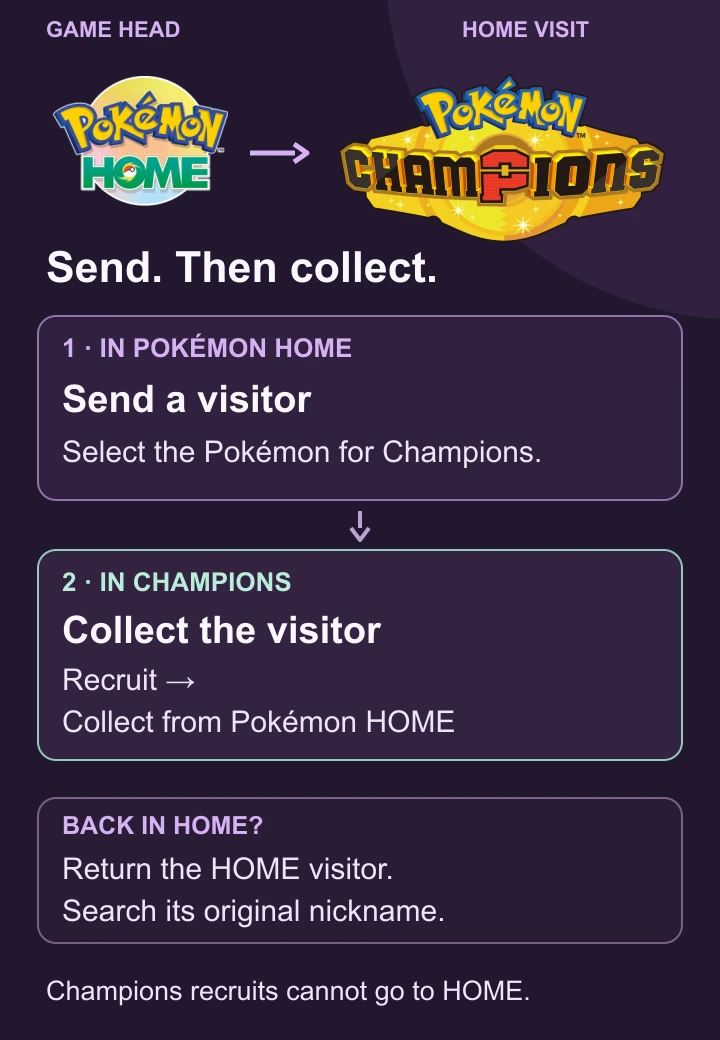
Sent a Pokémon from HOME but cannot see it in Champions? Open Recruit → Collect from Pokémon HOME. Sending the visitor does not replace collecting it in the game. If you cannot select a particular Pokémon at all, check its eligibility instead. A Pokémon recruited inside Champions cannot be exported to HOME.
Which part is missing?
| Your situation | Check next |
|---|---|
| Sent from HOME, absent in Champions | Collect the visitor in the game’s Recruit menu. |
| A Pokémon cannot be selected | Check whether it can visit Champions; HOME compatibility is not universal. |
| A returned visitor seems missing | Search HOME using its original nickname. |
| You want to export a Champions recruit | That route is unavailable; recruits and HOME visitors have different rules. |
Check the account before a new link
Champions must use the same Nintendo Account as HOME. The account help says linked accounts cannot be removed or changed. Check before confirming a new link; unlinking is not a repair step. Do not create a different account just because a visitor has not been collected.
Send and collect a visitor on Switch
- Start Pokémon HOME on your Nintendo Switch or Switch 2 and choose Pokémon Champions from its main menu.
- Before confirming a first account link, check that it is the Nintendo Account you intend to use. Select the Pokémon to send as visitors, press Y and confirm the selection.
- Start Pokémon Champions and open Recruit → Collect from Pokémon HOME. Read any first-use information before continuing.
- Review the waiting Pokémon, confirm Collect from Pokémon HOME and finish the prompts. Sending from HOME and collecting in Champions are separate parts of the process.
Nintendo documents this console procedure. For the mobile version of HOME, use its in-app Help for the applicable instructions; console buttons are not a phone walkthrough.
Not every Pokémon can visit
The official Champions overview limits visitors to Pokémon that appear in Champions. Owning a Pokémon in HOME is not enough. Check the exact Pokémon you are selecting rather than treating every rejected selection as a current service outage.
HOME visitors can be sent back. Pokémon obtained inside Champions cannot go to HOME. These are different origins, even when the Pokémon are the same species.
Return a visitor and find it again
In Champions, use Recruit → Send Back to Pokémon HOME, select the visitor and review the confirmation. Support explains a useful naming detail: a battle-name change in Champions does not change the nickname in HOME. Search using the nickname the Pokémon had before its visit.
Do not confuse that with sending a recruit back to Roster Ranch. The return rules say you cannot encounter that individual recruited Pokémon again. This is not a way to export it to HOME.
The same error still appears
Note the exact error, the device, whether the Pokémon is a HOME visitor or a Champions recruit, and whether the failure happens during selection, collection or return. Those details give support a specific problem to investigate. A forum workaround involving another game is not proof that your Pokémon needs that detour.
If a message persists after you have checked the documented route, use support rather than repeatedly changing accounts or moving valuable Pokémon through unrelated games.
Questions about HOME visitors
Can I send a Pokémon recruited in Champions to HOME?
No. Pokémon obtained in Champions cannot be sent to HOME. Returning a HOME visitor is a separate operation.
Why is a returned Pokémon not under its Champions name?
Its battle name in Champions does not rename it in HOME. Search HOME using its original nickname.
Does this guide use the mobile HOME menus?
No. The numbered walkthrough is Nintendo’s console route. For the mobile version, use the instructions in HOME’s Help menu.