

If ARC Raiders voice chat is not working, first separate three checks: microphone input, party chat and proximity chat. A working Discord call does not tell you which game channel is selected. If one in-game channel works, start with the failing channel’s settings before changing your whole setup.
Which part of voice chat is failing?
| What you notice | Check next |
|---|---|
| No usable microphone recording outside the game | Input device, mute and system microphone access. |
| A system recording works; neither game channel works | Game microphone selection and voice-chat activation. |
| Teammates hear you in party chat, but proximity fails | The separate proximity speaking mode and its assigned push-to-talk control. |
| Proximity works, but the squad cannot hear party chat | Party speaking mode and whether you are using a console party instead. |
| You hear friends through a console party only | Switch to game chat before testing ARC Raiders voice. |
Do the comparison with someone who can answer. Silence from an unfamiliar nearby player is inconclusive: they may simply choose not to respond. This is a troubleshooting order, not a promise that every audio failure has one cause.
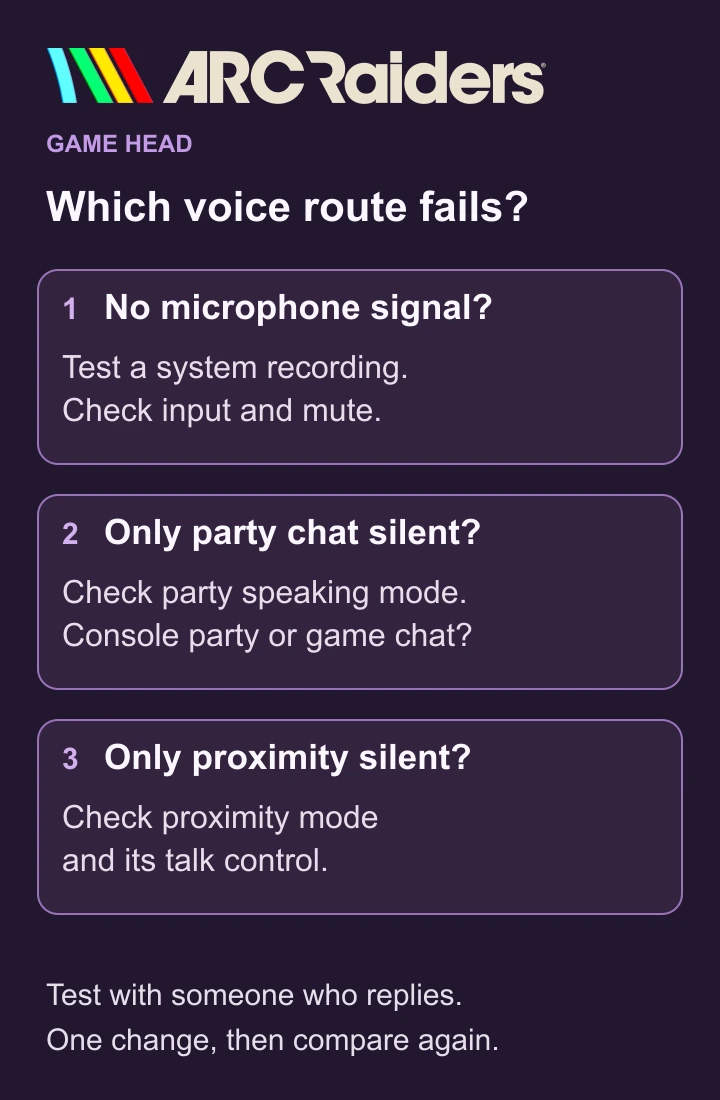
Run the four-step voice check
- Check whether your microphone produces a usable recording outside ARC Raiders. On Windows11, use the input-device test in Sound settings.
- Open the game’s audio settings, enable voice chat and select the intended microphone on PC.
- Check the speaking mode for the channel you want: party or proximity. For push-to-talk, use that channel’s assigned control.
- Ask a teammate which channel they can hear. Change one relevant setting, repeat the same check and keep the result.
In Embark’s communication settings, voice activation is under Settings → Audio. Party and proximity can use different speaking modes. Proximity also reaches Raiders outside your squad, so open-mic proximity is not a private conversation.
PC: test the input before replacing settings
In Windows11, open System → Sound, choose your microphone under Input and record a short sample with its test. Listen back. If the sample is silent, ARC Raiders is not yet the useful place to diagnose the missing signal. Microsoft shows the input-device test here.
For a working system mic that the game cannot use, check microphone access under Privacy & security, including desktop-app access. A mute switch or loose connection also belongs in this check. Microsoft’s microphone troubleshooting explains these controls.
Then choose the intended input in the game’s audio menu. Compare the failing channel’s speaking mode; for a short check, try open mic and switch back afterwards if you prefer push-to-talk. Closing an unnecessary microphone app and relaunching the game is another documented check. Embark’s PC voice guide covers these options.
PS5: game chat and recording permissions are separate
Check that game-chat audio is not disabled in the PS5 control centre’s Sound panel. On the voice-chat card, select game chat when testing in-game communication rather than a PlayStation party. Sony explains game-chat muting and chat switching.
A permission to include your voice in someone else’s broadcasts or video clips serves a different purpose. Leave that choice to your recording preferences; it is not evidence that your microphone reaches ARC Raiders. Sony describes that permission separately in its voice-chat settings.
Xbox: check which chat you are actually using
An Xbox party can keep the conversation outside the game. Open your party through Parties & Chats and choose Switch to game chat. For a cross-network group, also inspect the account’s communication permissions; a family organizer should handle managed-account restrictions. Embark’s console guide describes both checks.
Still silent? Record the failing route
Write down the platform, input device, speaking mode and whether party, proximity or both failed. Include whether a system recording worked, what changed and the result after restarting the game. That gives support something more useful than “my mic is broken.”
Avoid changing several unrelated settings between checks: if the next attempt works, you will not know which change mattered. A reinstall or a new headset is a poor first diagnostic step when you have not identified the failed route.
Not in the same squad yet? Use our ARC Raiders friends and party guide for invitations and joining. That is a separate problem from a joined squad with no voice.
Quick questions about ARC Raiders voice chat
Why does party chat work but proximity does not?
Check proximity’s own speaking mode and assigned push-to-talk control. A working party conversation narrows the problem; it does not confirm proximity is configured correctly.
Does no reply in proximity mean my microphone is broken?
No. Another player may not respond. Use a cooperative listener and compare the channels before drawing that conclusion.
Should I change every setting at once?
Change one relevant setting, repeat the same check and note the outcome. Otherwise you cannot tell which change helped.