

Stardew Valley has limited crossplay: PC players can play together, and Android or iOS can join a PC farm through an experimental mode. That does not open PC farms to PlayStation, Xbox or Switch. Check the actual device pair before buying a second copy.
Which devices can share a farm?
| Devices | Can you play together? |
|---|---|
| Steam + GOG on PC | Yes, with compatible game versions. |
| Phone + PC host | Experimental: connect by IP, initially on the same home network. |
| Apple Arcade + PC | No: Stardew Valley+ lacks the experimental mode. |
| PC + console | No standard crossplay with PlayStation, Xbox or Switch. |
| PlayStation + Xbox or Switch | No standard crossplay between these consoles. |
The Stardew Valley community wiki documents the console restrictions. Steam/GOG invitations have a separate PC history in the developer’s multiplayer explanation. Do not use its old four-player beta limit as today’s PC limit.
Switch 2: player count and crossplay are different questions
Nintendo lists eight online players and four-player split-screen for the Switch 2 Edition. Those numbers describe that edition’s modes; they do not establish compatibility with a PC farm. Check the edition as well as the console. A higher player cap is not a crossplay announcement.
Connect a phone to a PC-hosted farm
The official mobile guide excludes Apple Arcade and calls this feature experimental. Start with a backup and a PC host on your local network.
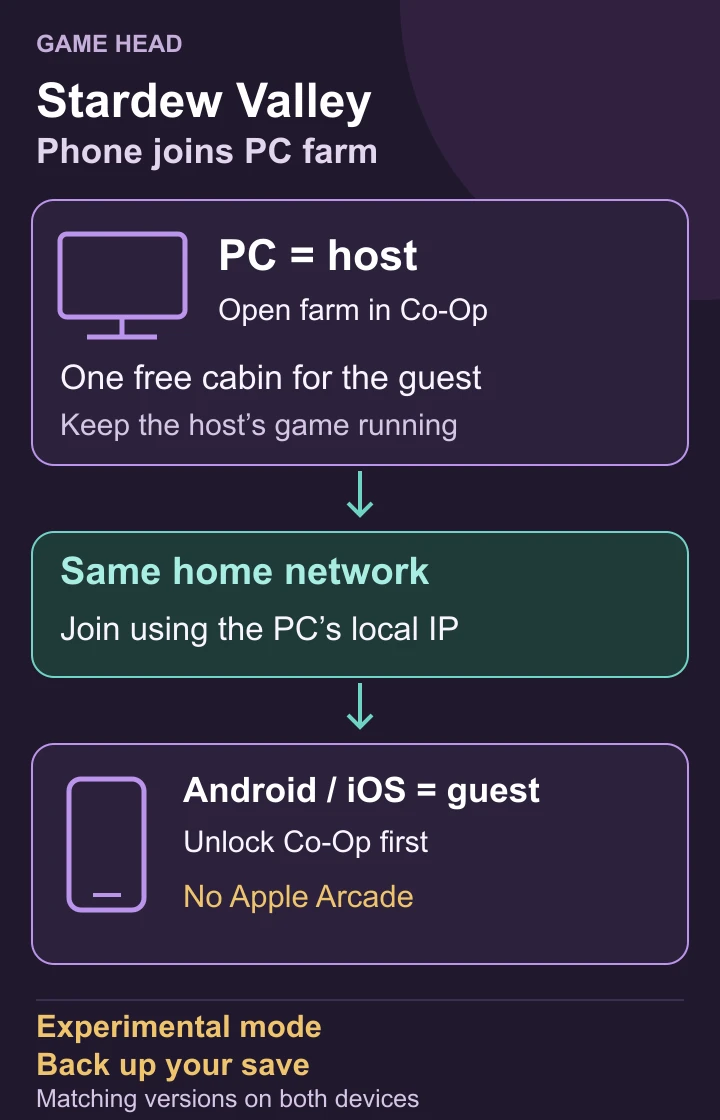
- Back up the farm, then compare game versions on both devices. Use a spare farm for the first connection.
- On the PC, open the farm through Co-Op and the Host tab. Make sure a cabin is available for the joining player.
- On Android or iOS, unlock Co-Op: tap the title-screen leaves up, up, down, down, left, right, left, right; open and close the question-mark menu.
- Join the PC farm by its local IP address while both devices use the same home network. Check that the guest reaches the intended farm before continuing your main save.
On the phone, open Co-Op → Join, then enter the host PC’s local IP address.
For desktop hosting, the developer’s LAN instructions distinguish the PC’s local address from its public internet address. A “what is my IP” search gives the wrong address for this same-network setup. Check that IP connections are accepted by the host.
Find it on Windows 10 or 11: Open Settings → Network & internet, choose your connected Wi-Fi network or Ethernet, and look for IPv4 address. Enter that PC address on the phone—not the default gateway. Microsoft explains the network settings.
The guest cannot connect: check these first
- Version mismatch: compare the version shown through the title-screen question mark. The official troubleshooting guide requires matching versions.
- Farm opened through Load: return to the title screen and host it through Co-Op. A single-player session is not an open multiplayer farm.
- No room for the guest: check for an available cabin. On an existing farm, Robin can build one at the Carpenter’s Shop; the community wiki lists a standard cost of 100g. Cabin limits depend on the platform.
- No desktop invite option: check whether Steam or GOG Galaxy is running and signed in. Mobile IP joining and desktop invitation codes are different routes.
iPhone or iPad: The developer notes that the first connection may fail after you allow access to the local network. Try joining again after granting permission.
For the first attempt, keep the device pair and connection route simple. Write down the versions, which device hosts and the exact error. Do not delete the save or change several unrelated settings at once.
Questions about Stardew crossplay
Does eight-player co-op mean PC and Switch 2 can play together?
No. Player capacity describes a mode; it does not prove that two platform editions can connect.
Do I need an invite code to join a PC farm from my phone?
The experimental mobile route uses the host’s IP address rather than a farm-discovery list.