
Slay the Spire 2 supports online co-op for up to four players: one host and up to three guests. Arrange your group through Steam friends. Mega Crit currently describes this as friends-only co-op without public matchmaking.
This guide covers the Steam Early Access version on Windows, macOS and Linux. Start with a new group session; continuing an existing run is a separate task.
Before you open the lobby
- Make sure each person can start the game on the Steam account they will use.
- Add the host to your Steam friends list and decide who will create the session.
- Check whether anyone is using the beta branch or mods. Keep that information handy if an invitation fails.
Host: create the session and invite your friends
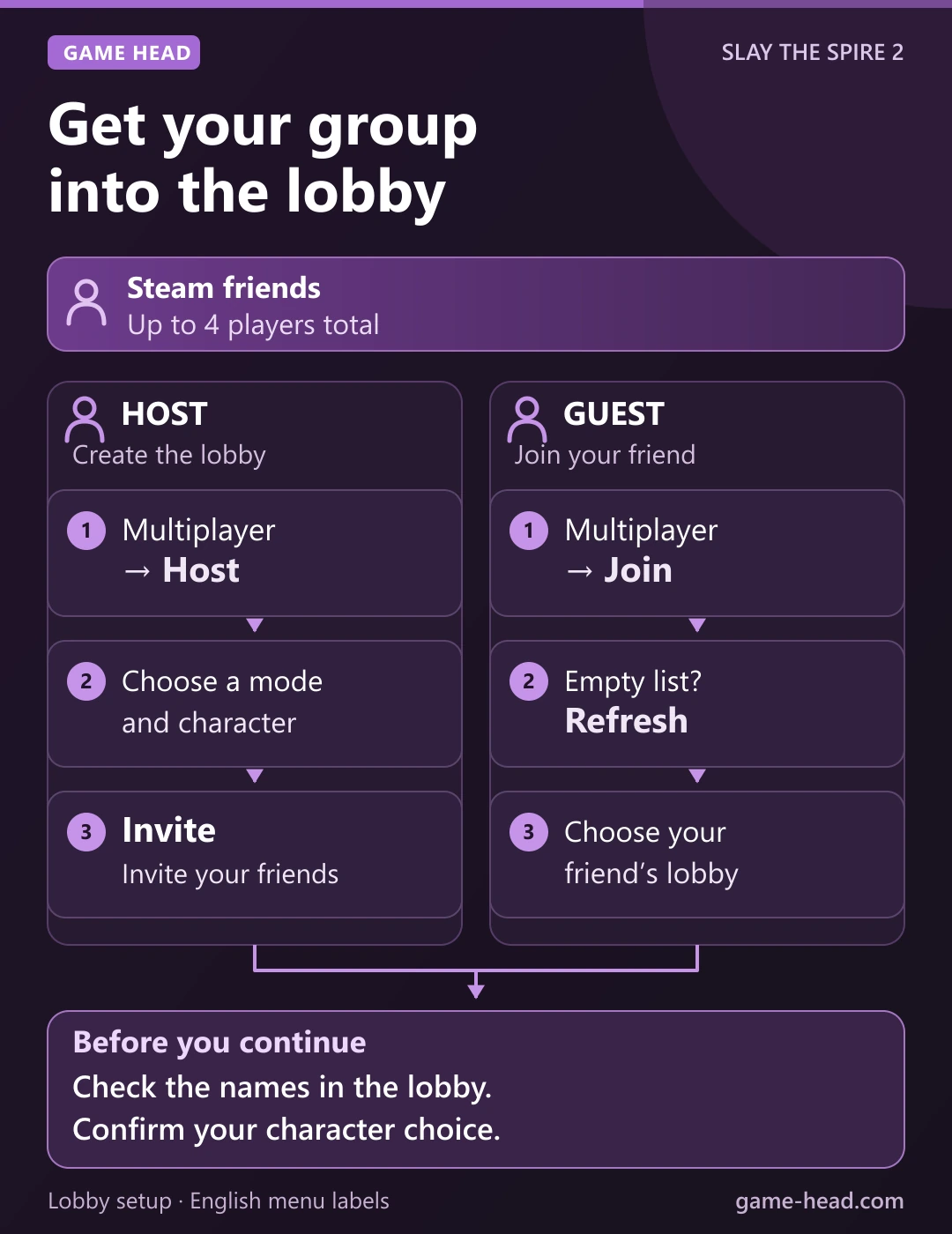
The host creates the session. The English menu walkthrough shows the Host and Invite controls.
- Open Multiplayer from the main menu, then choose Host.
- Choose the type of run you want to host, then select your character.
- On the character screen, choose Invite and select your Steam friend in Choose Friend to Invite.
- Keep the lobby open while your friends join. Check that the intended players are present before confirming your character.
Your friends should appear in the same party before the group starts. If the screen still says You are the only player!, check the invitation and the guest’s joining screen first.
Guest: join the host’s session
The English joining menu calls the friend-selection window Choose Friend to Join.
- Start the game, open Multiplayer and choose Join.
- Select the host’s session in Choose Friend to Join. If the list is empty, ask the host to keep the lobby open, then choose Refresh.
- After joining, choose your character. Check that you have entered the intended lobby before confirming your selection.
You should be in the host’s lobby. Wait until the intended players are present before confirming the start.
If the invitation or lobby is missing
- The host is still alone: check which Steam account received the invitation. Keep the host’s lobby open while the guest tries the joining route above.
- You cannot find your friend’s session: confirm that you are Steam friends and compare the game version and branch each person is running. Record the exact error rather than repeatedly creating new sessions.
- Your group uses mods: compare the enabled mod lists. Mega Crit’s v0.108.0 beta notes recommend the same enabled mods, especially those that change gameplay.
- Invite reports a disabled Steam overlay: the v0.111.0 beta notes describe that error. Check the overlay in this case; this particular message is documented for the beta in that source.
Keep your existing saves while investigating an invitation problem. If the same error repeats, use F2 or the in-game settings to send the developer-supported bug report. Include the host and guest actions, game versions, branches and error message.
If Steam shows a cloud conflict before the game starts, handle it separately from a missing lobby. Our Steam Cloud conflict guide explains how to compare the saves on offer.
Common questions
How many players can play Slay the Spire 2 co-op?
Up to four people can play together online: one host and up to three other players.
Does Slay the Spire 2 have public matchmaking?
Mega Crit currently describes co-op through Steam friends, without public matchmaking. Arrange a group through your friends list before opening a session.
Why does Join say No friends currently playing multiplayer?
The list is not showing a friend’s multiplayer session. Ask the host to keep the lobby open, check your Steam friendship and use Refresh. If the host is still waiting in an open lobby and you still cannot join, compare the game versions, branch and enabled mods. Use F2 to report a reproducible problem after those checks.
Do players take separate turns in co-op?
As multiplayer developer Edward Lu explains, players act simultaneously during the team’s turn. Coordinate your card plays and route choices with the group.