
If OBS Game Capture is black, first record a short clip while the game is active. A fullscreen game can stop rendering when you switch to OBS. If the saved video is black too, check the selected window, capture compatibility and GPU assignment.
These steps cover Game Capture on Windows. macOS and Linux use different capture sources.
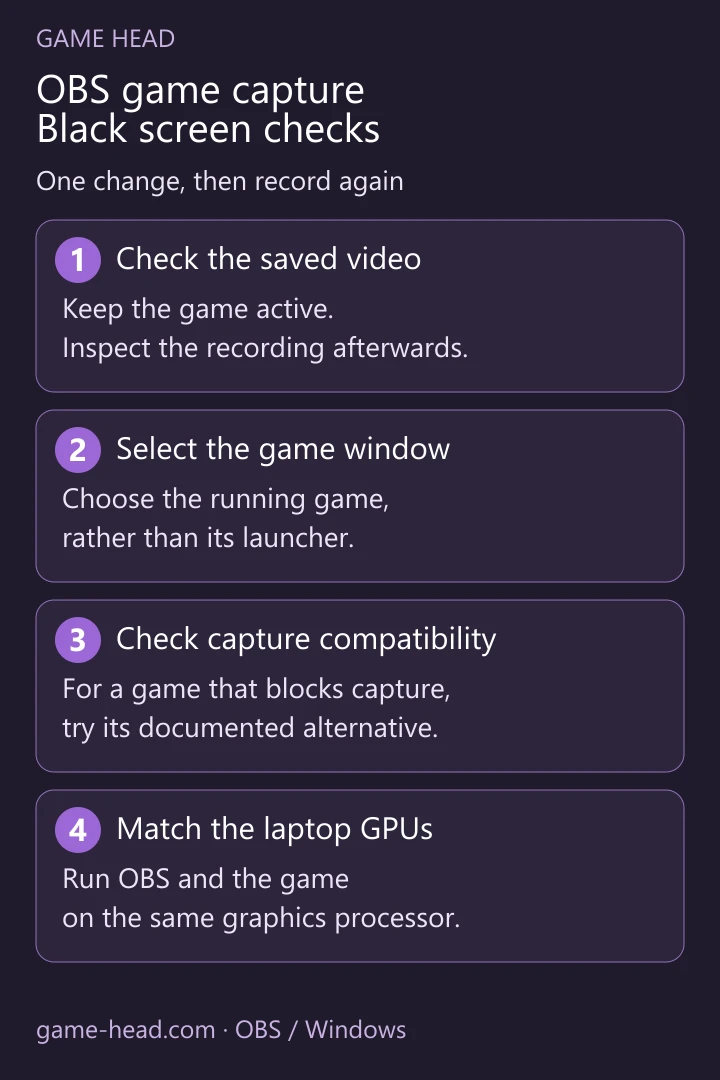
Start with the source and a real recording
- Open the game. In OBS, choose Sources → + → Game Capture. For this check, use one Game Capture source in the scene.
- Open its properties, select Capture specific window, then select the running game under Window. Choose the game itself, not its launcher.
- Return to the game and record about 20 seconds of play. Stop the recording and inspect the file. This separates a capture failure from a preview that goes black after Alt+Tab.
The official setup guide explains the capture modes. Keep the other source options at their defaults while checking the window.
Match the next check to what you see
| What you see | Next check |
|---|---|
| Only the preview turns black after Alt+Tab | Inspect a recording made with the game active. |
| A red dot or a tiny game image | Right-click the source: Transform → Reset Transform, then Fit to Screen. |
| One particular game will not capture | Check its entry in the OBS troubleshooting list; try the documented alternative. |
| A laptop with two graphics cards | Check which GPU runs OBS and which runs the game. |
OBS lists game-specific capture limits. For example, its guidance for Destiny 2 and Roblox points to Window Capture. A different bitrate will not make an unsupported capture hook work.
On a laptop, check both applications’ GPU
For Game Capture, OBS and the game need to run on the same GPU. Follow the GPU selection guide: close OBS, open Windows Settings → System → Display → Graphics, and add obs64.exe if needed. Select the high-performance GPU used by the game and check the game’s assignment too. Restart both.
Do not apply an old Display Capture workaround to this problem: OBS’s laptop notes describe a newer display-capture method that can work across GPUs. That is a different capture source.
Use Window Capture when the game requires it
Switch the game to windowed or borderless mode and add Window Capture as directed for that game. Select its window. Window Capture targets that window’s contents; Display Capture instead exposes a monitor’s desktop, which can include other windows and notifications.
Check overlays and game-specific permissions
Close FPS overlays or another recording application temporarily, then retest. OBS documents hook conflicts with overlays and capture tools. Re-enable them one at a time to identify a conflict.
Some games have a specific administrator requirement in the OBS troubleshooting list. Check that game’s entry before changing permissions. If capture still fails, note the game, OBS version, GPU and whether the saved file is black when asking for help.
For scene layout and a local test, use our OBS setup guide. Once the picture works, our separate-audio-track guide covers game sound, microphone and Discord.
Questions about black Game Capture
Why does Game Capture turn black after Alt+Tab?
A fullscreen game can stop rendering when you switch away. Record a short clip with the game active and inspect the saved file before treating the black preview as a capture failure.
Do OBS and the game need to use the same GPU?
For Game Capture on a multi-GPU system, yes. Check both applications in Windows graphics settings; OBS recommends the high-performance GPU. Restart OBS and the game after changing their assignment.
Should I always run OBS as administrator?
No. OBS lists administrator requirements for particular games. Check your game’s entry first; other cases need a different capture method or another check instead.