
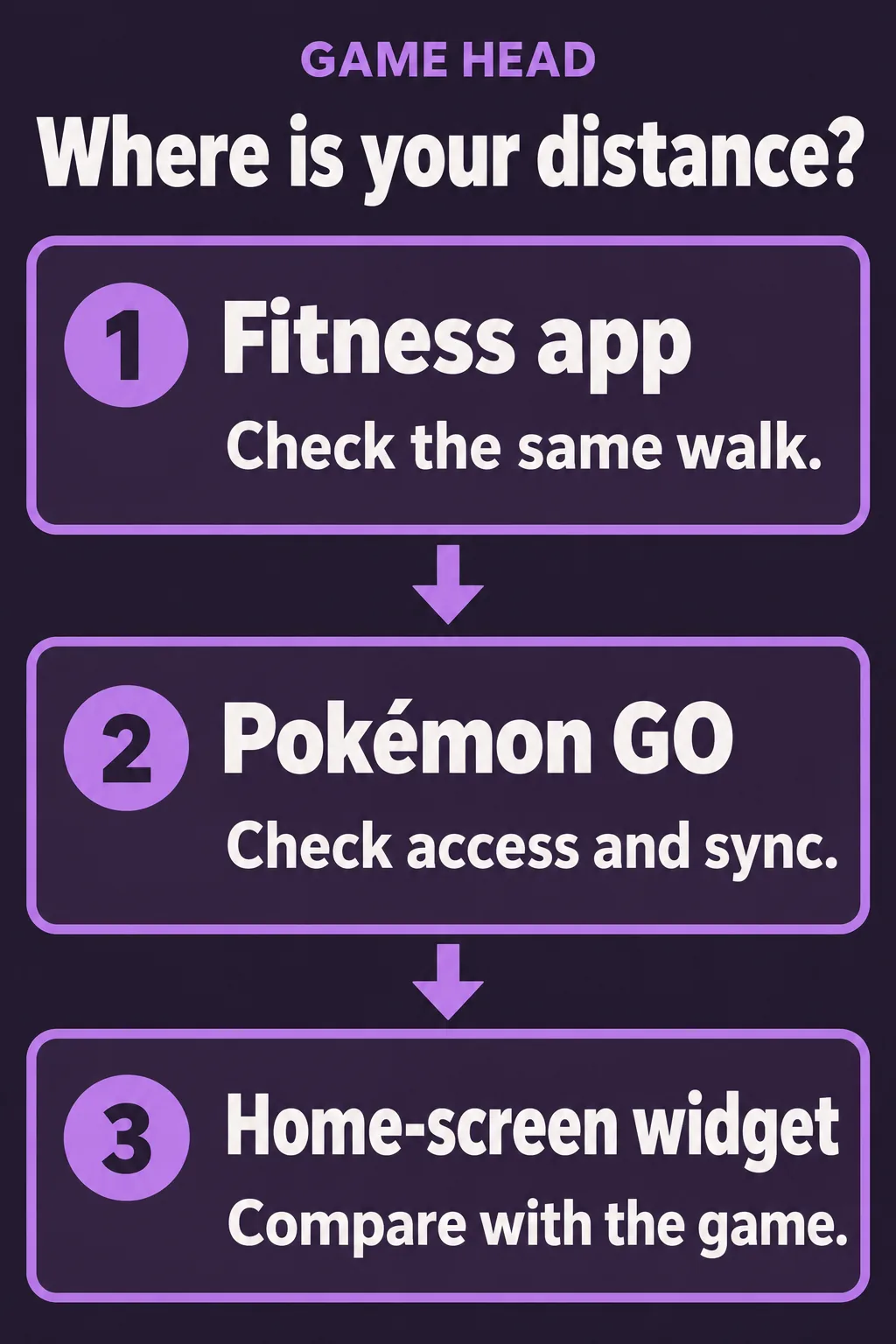
If Adventure Sync is not counting, first check whether Google Fit or Apple Health recorded the activity. Then check Pokémon GO’s connection and permissions. If the game has already credited the distance but the home-screen widget has not, you are investigating a different delay. Start with the screen that is missing the update.
Find where the distance stops
Compare the same walk and time period in your fitness app, the game and the widget. Use the same time period throughout, so you do not mistake a daily step total for the distance added since your last check.
| What you see | First check |
|---|---|
| No activity in Fit or Health | Check the phone’s activity recording before changing the game. |
| Activity in Fit or Health, but no new game distance | Check Adventure Sync, the app connection and permissions. |
| Distance in the game, but an older widget value | Check the widget again later; the game has already received that distance. |
Enable Adventure Sync
The feature is available from Trainer Level 5. Pokémon GO’s setup instructions use the following menu path:
- Open the Main Menu in Pokémon GO.
- Open Settings.
- Choose General.
- Select Adventure Sync, read the access prompts and enable the required location and fitness-data permissions.
Adventure Sync is optional. To switch it off again, return to the same game setting and clear the option. A location permission and access to fitness data are separate parts of the setup.
Android: check Google Fit and the app connection
- Open Google Fit and look at the activity recorded for the walk you are checking.
- In Fit, open Profile, then Settings and Manage connected apps. Check whether Pokémon GO is connected.
- Open your phone’s app permissions for Pokémon GO and check its location access. Menu names vary between Android devices.
Google explains how to inspect connected Fit apps. If your activity reaches Fit through Health Connect, also check the existing Sync Fit with Health Connect setting under Fit’s Profile and Settings. Google’s Health Connect instructions cover that connection. This does not replace the Adventure Sync switch inside Pokémon GO.
iPhone: check Health access and background location
- Open Apple Health and check whether the relevant walk appears in its activity data.
- Open your Health profile and look under Privacy and Apps for Pokémon GO. Review the data access it has requested.
- In the iPhone’s location settings for Pokémon GO, check that location access is set to Always for this background feature.
Apple documents the profile and Apps controls. These are distinct from the game’s own toggle. If Health itself has no activity, check the iPhone’s recording first.
Recorded activity can arrive later
The official troubleshooting page says fitness-data synchronization can take several hours. Reopening the game may help. Give a recorded walk time to arrive before changing several settings at once.
Phone-level power saving, and power-saving settings for the fitness app, can interfere with the required sensors. If active, turn them off for a comparison and check the result. Manually entered Health or Fit data is not credited by Adventure Sync.
If only the widget is behind
The widget instructions give a separate delay of up to an hour for recorded distance to reach the widget. Check your current progress in the game first. This widget delay is not the same as the several-hour fitness-data synchronization described above.
Make one change, then compare
Note the current values, make one relevant change and carry the phone on a normal short walk. Check the fitness app before comparing the game again. This makes it easier to tell whether recording, access or the display changed.
If it still fails, use the game’s in-app support. Include the phone and OS, game version, the setting you checked and which of the three screens is missing the update. Those details describe the problem more clearly than “my steps disappeared.”
Adventure Sync questions
Does Adventure Sync work when Pokémon GO is closed?
Yes. It is designed to record distance when the game is not open. The feature must be enabled, the required permissions granted and the connected fitness app working.
Google Fit or Health has steps. Why is Pokémon GO behind?
Check the connection to Pokémon GO and its background location access. The game’s support also allows for a delay of several hours; a missing instant update does not by itself prove tracking has failed.
Can I add missing steps manually?
Manually entered fitness data in Apple Health or Google Fit does not count towards Adventure Sync progress.
How long can the widget take to update?
The Pokémon GO help page says recorded distance can take up to an hour to reach the widget. Compare it with the in-game value before changing permissions.